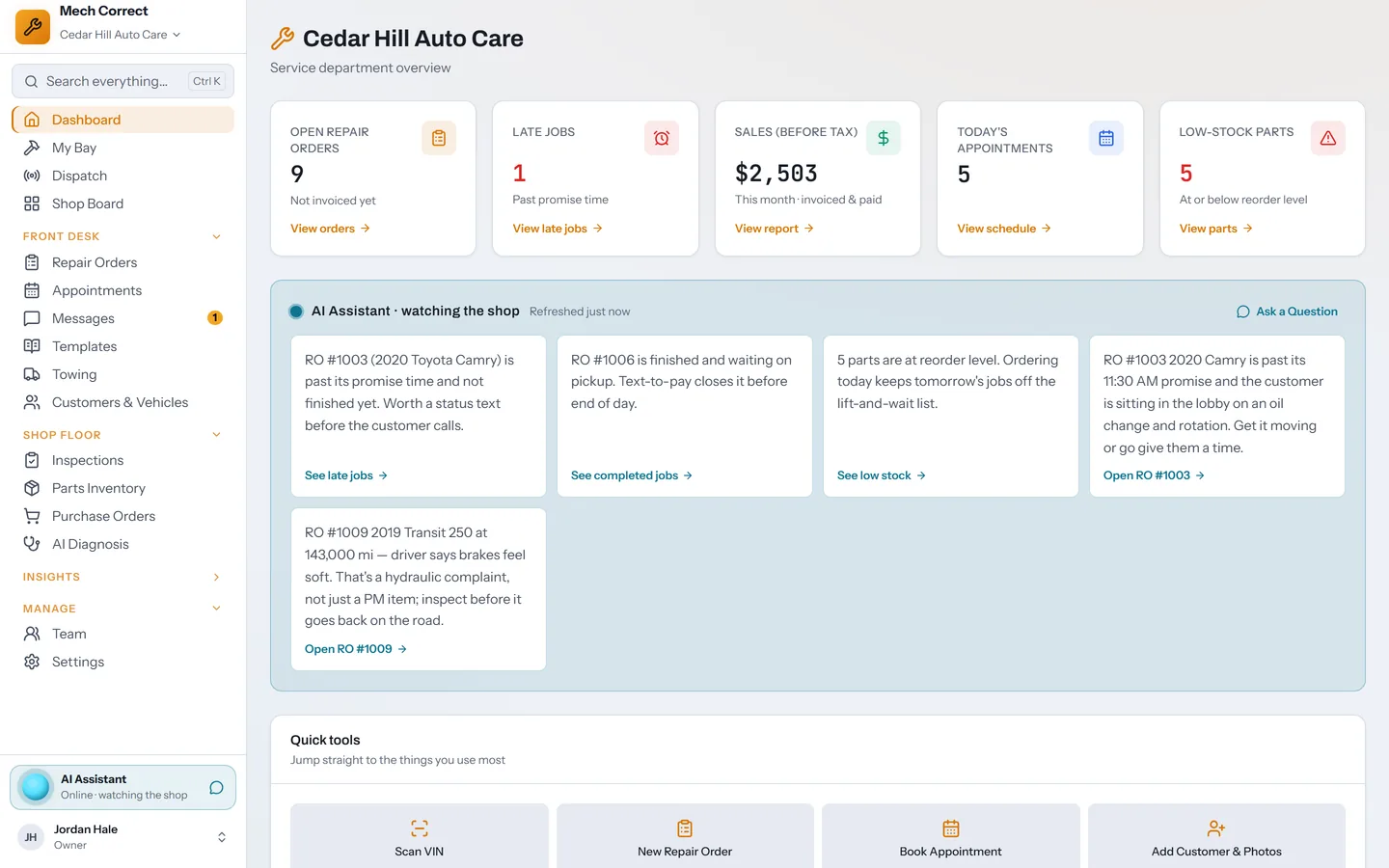
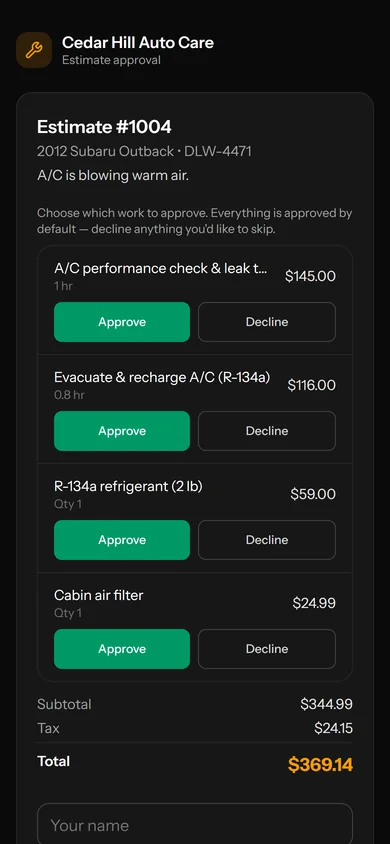
Mech Correct runs repair orders, inspections, the shop board, parts, and payments in one app. Findings turn into a text estimate your customer approves line by line, and every line they decline waits on your follow-up list.
14 days freeNo card to startEvery feature in every plan
mechcorrect.app
One visit, start to finish
Follow a car from the lane to the follow-up.
Each step hands off to the next on the same ticket, so nobody re-types a VIN, chases a signature, or keeps a list on a sticky note.
01
Check in
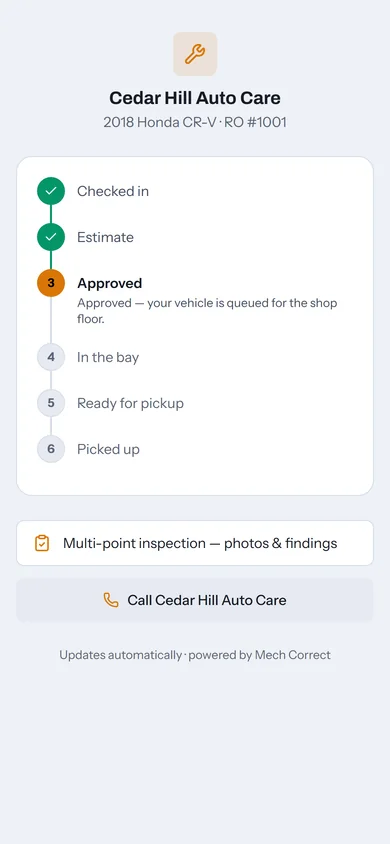
Scan the VIN or plate. The customer, past visits, and open recalls for the model load before the keys hit the hook.
02
Inspect
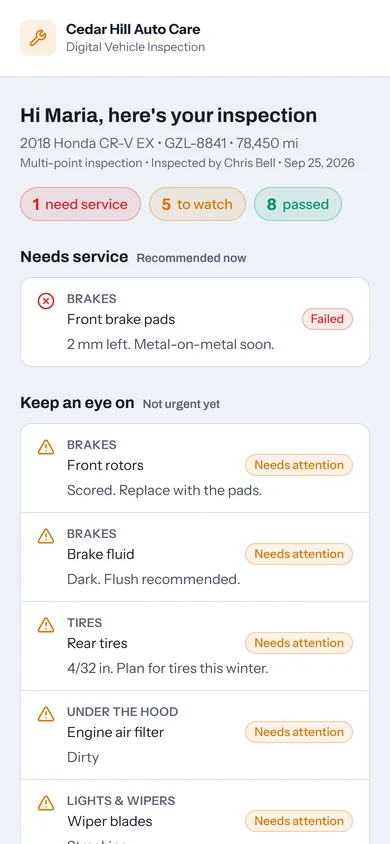
Tap a measured tread depth or pad thickness and the item rates itself. Photos attach to the finding.
03
Approve
One text carries the estimate and the inspection photos. The customer answers each line, and you see when they open it.
04
Work
Start Work starts the tech's clock. The board shows who is on what, what is late, and what waits on parts.
05
Get paid
Text a card payment link or take payment at the counter. The ticket closes itself at a zero balance.
06
Follow up
Declined lines and unsold findings land on one list to text or book. Automatic texts handle the reminders.
Shop board and dispatch
Every bay at a glance.
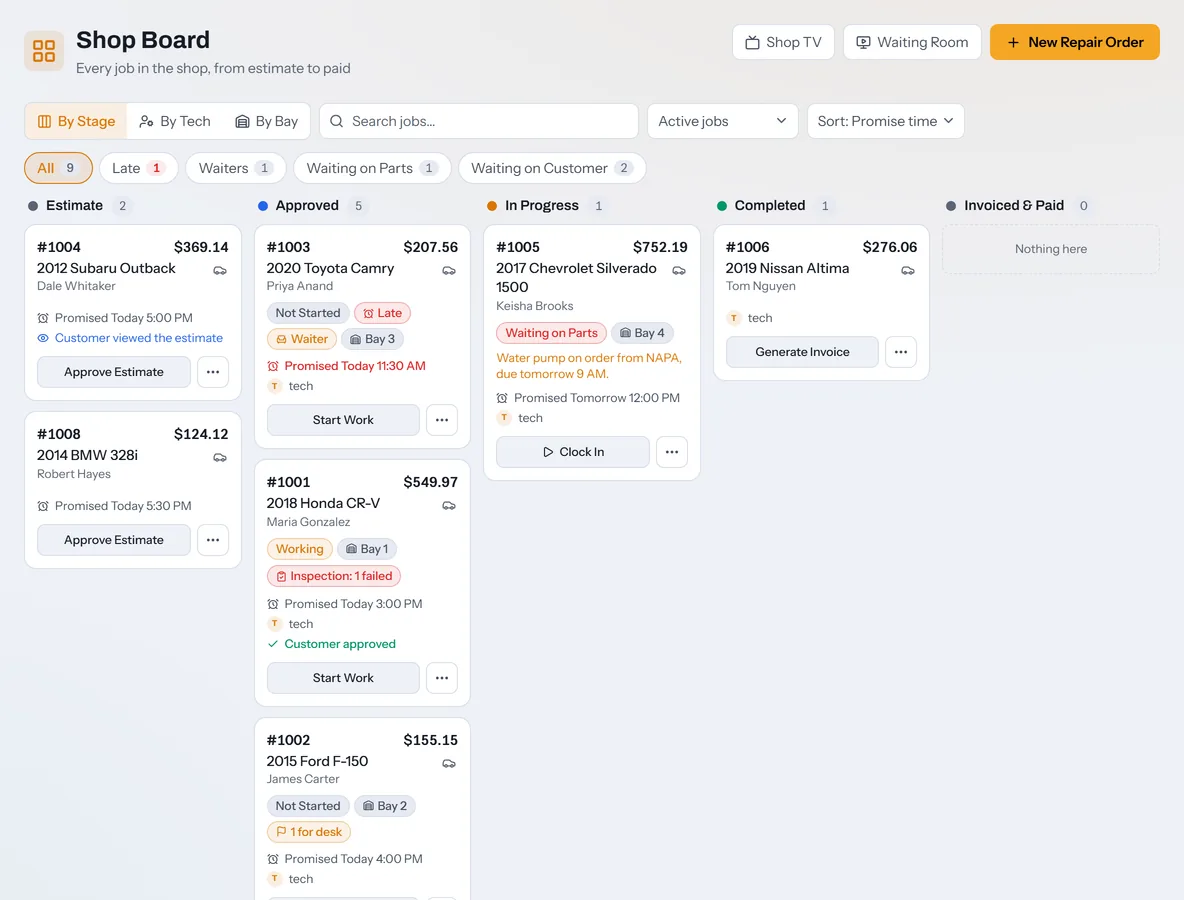
The Shop Board follows each job from estimate to paid. Group it by stage, by tech, or by bay, and filter to late jobs or waiting customers in one tap.
Lanes for Estimate, Approved, In Progress, Completed, and Invoiced & Paid
Filters for Late, Waiters, Waiting on Parts, and Waiting on Customer
Dispatch offers open jobs to techs and shows who is on the clock
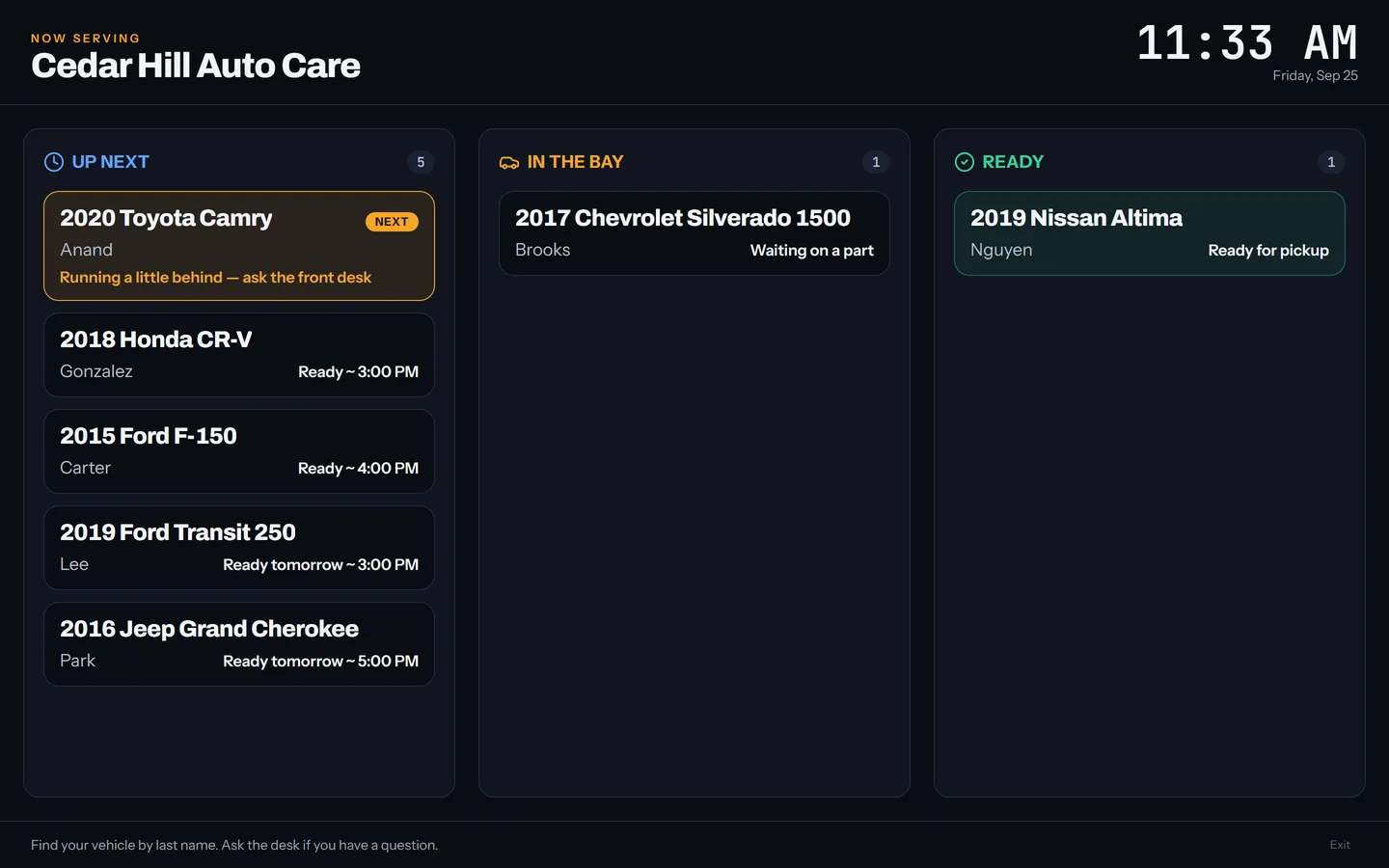
Shop TV mode for the wall, with no prices or customer names
mechcorrect.app/board
Estimates and approvals
Estimates customers approve from their phone.
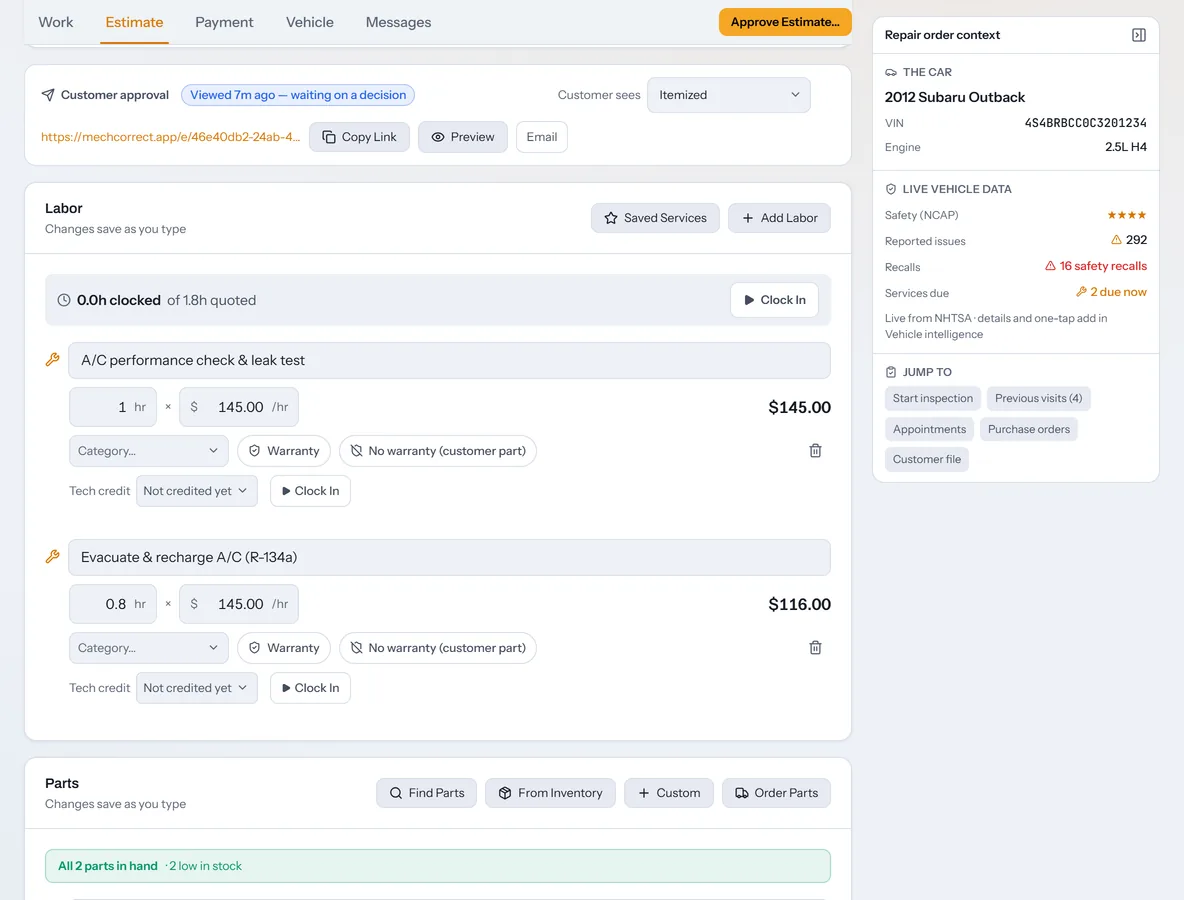
Build the ticket from labor, parts, and saved services, then send one link. Your customer sees the findings with photos and answers each line, with tax included in the total.
See the moment the customer opens the estimate
Preview exactly what they will see before you send it
Record approvals taken at the counter or over the phone
Parts margin, a markup matrix, and a warning when a part has no cost
Paid tickets lock until someone taps Edit
mechcorrect.app/repair-orders
Digital inspections
Inspections that rate themselves.
A tech taps the measured tread depth or pad thickness and the item marks itself Pass, Attention, or Fail. The customer's report opens on what needs service now.
A 30-point inspection and a 19-item check-in walk-around
Photos, video, or a PDF on any finding
Add a finding to the estimate in one tap
Customers can e-sign the report from the link
AI Diagnosis
A second opinion in the bay, in every plan.
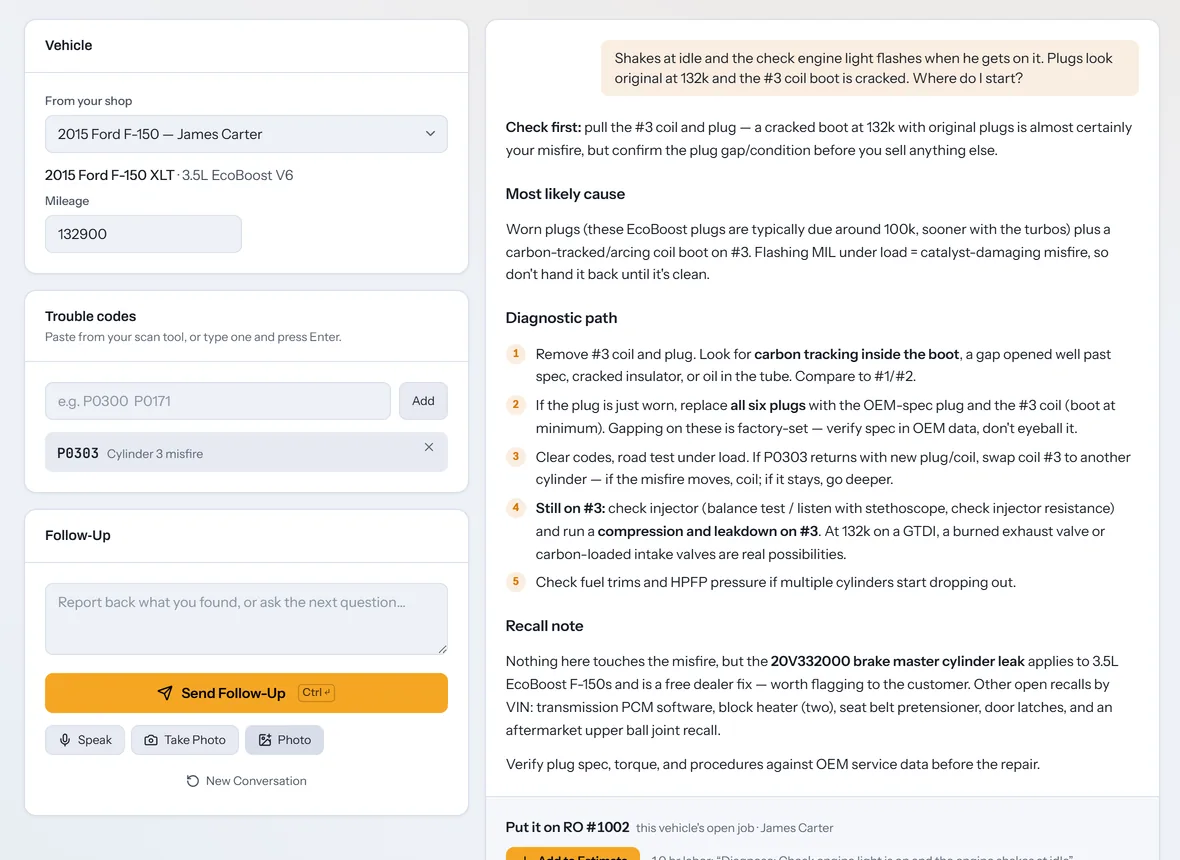
Pick the vehicle, add the trouble codes, describe the symptom, and attach up to three photos. AI Diagnosis returns the likely cause and an ordered test plan, usually in 10 to 25 seconds.
Grounded in NHTSA recalls, owner complaints, and service bulletins for the model
Weighs your shop's own past jobs on similar vehicles
Adds the diagnosis to the ticket as a labor line, or saves it to the findings
Keeps going as the tech reports test results back
It never invents OEM specs. Every answer ends with a reminder to verify against OEM service data before the repair.
mechcorrect.app/advisor
A real answer from the app, on a sample shop's truck.
The AI Assistant watches the shop
It writes short notes on the dashboard: a job past its promise time, a car ready for pickup, parts at their reorder point. Ask it about any open repair order.
Prices at your rates
Ask what to charge and owners and writers get an estimate at your own labor and tax rates. Technicians get hours only, never dollars.
Reads the VIN for you
Snap a photo of the door jamb when the barcode is scratched. The VIN decodes into a full spec sheet with open recalls for the model.
For technicians
Built for the bay, with the money kept up front.
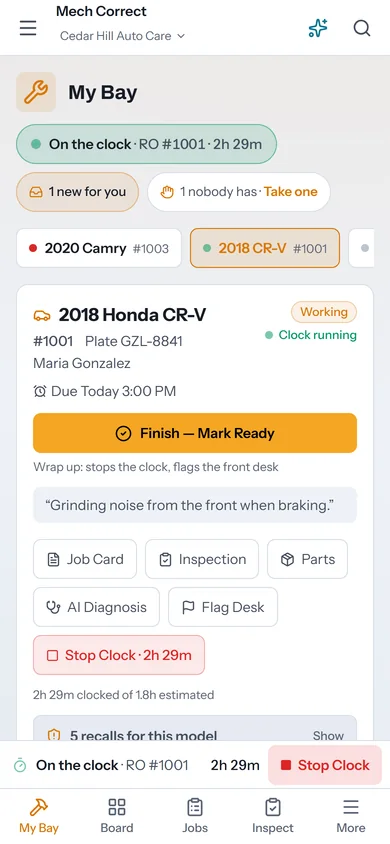
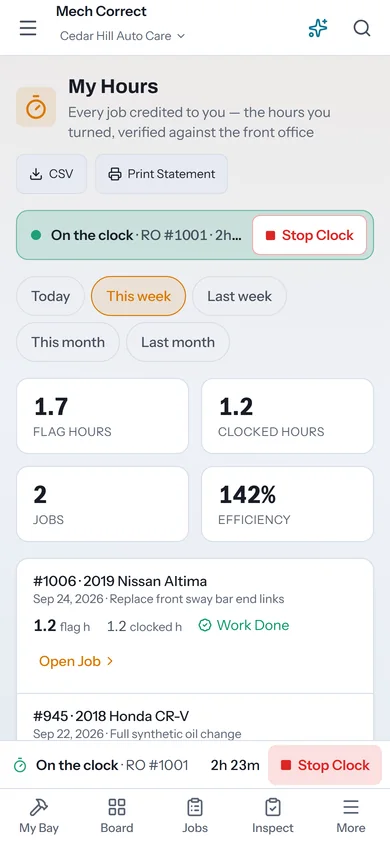
Technician logins land in My Bay with one clear next step. Start Work starts the clock, and a flag reaches the front desk without a walk to the counter.
No prices, totals, or invoices on a technician login
Flags for recommended work, a line they can't do, or a question
My Hours shows flag hours against clocked hours, with a printable statement
Glove-sized buttons and a phone layout with bottom tabs
Texting and automations
Texting that keeps cars moving.
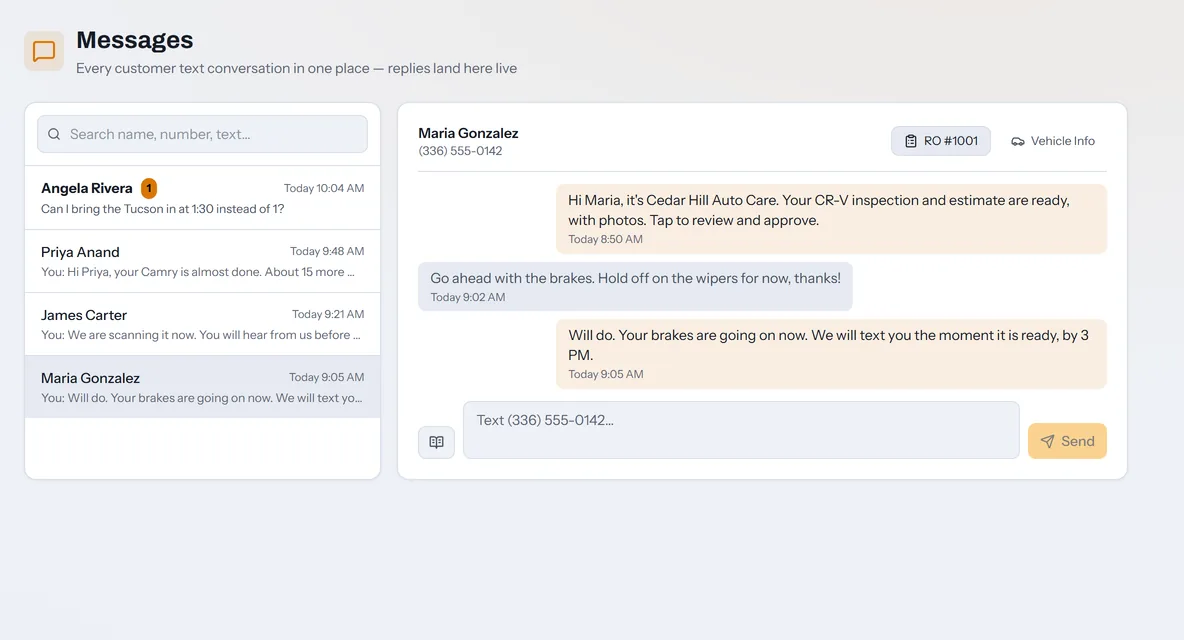
Texting is built in and runs on your own Twilio number. Every conversation sits in one inbox and on its repair order.
A two-way inbox with 17 editable templates that fill in the customer, the vehicle, the balance, and your review link
Automatic texts for appointment reminders, declined work, 6-month maintenance, birthdays, and 12-month win-backs
A live status link customers can check any time
Bring Customers Back lists everyone away 3, 6, or 12 months
Connect your Twilio account in Settings. Twilio bills your messages directly, and we add nothing on top.
mechcorrect.app/messages
Owner numbers
The money you already found, in one list.
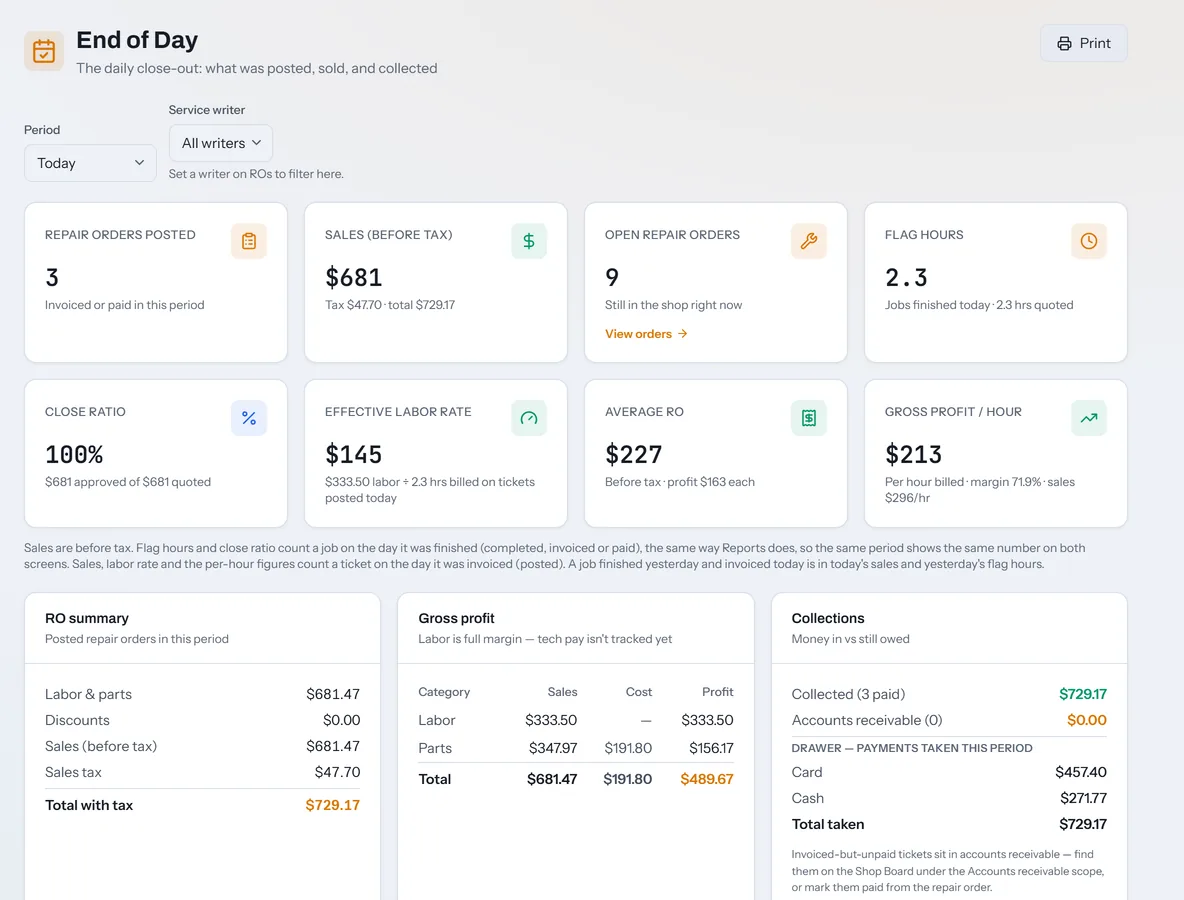
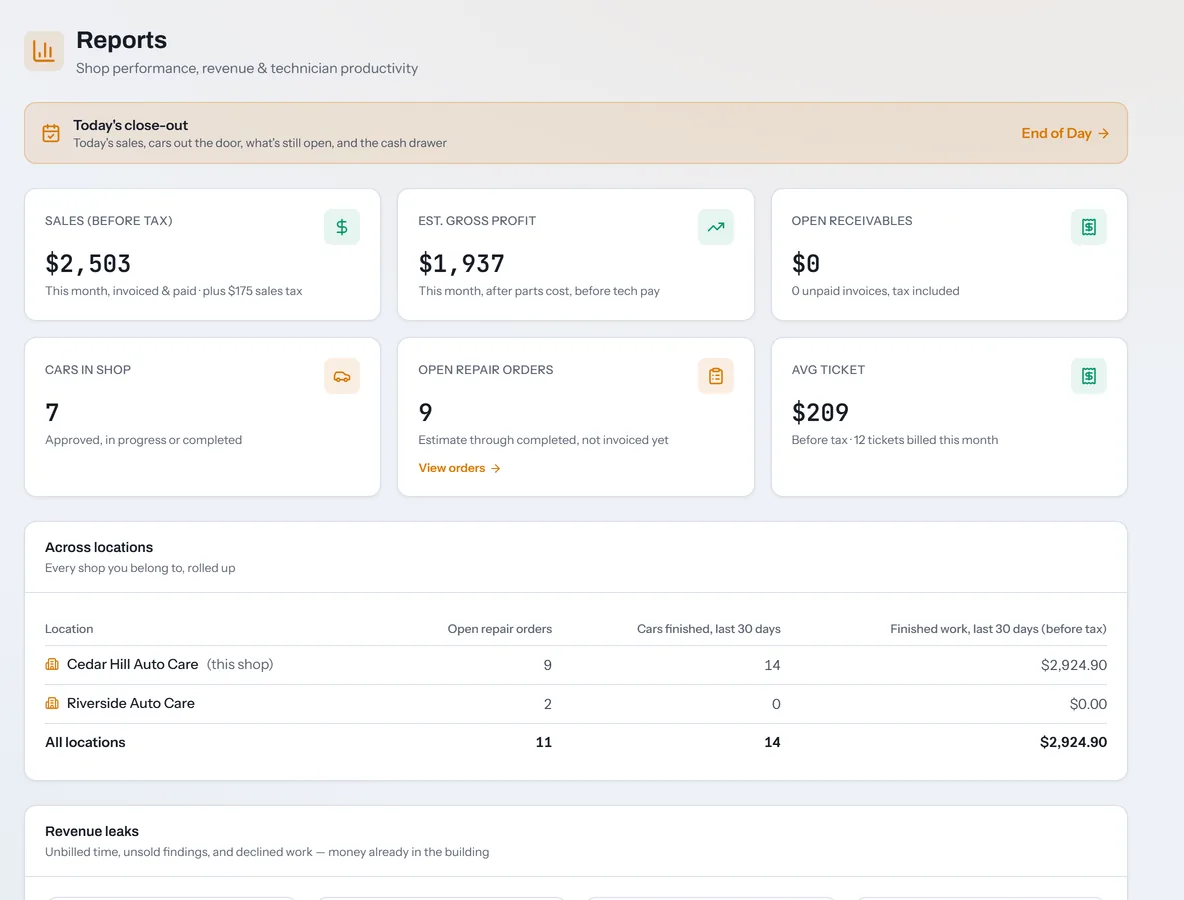
Declined lines and unsold findings land on the Follow-ups list with Text, Book, and Dismiss. Reports put a dollar figure on unbilled tech time and declined work, and End of Day closes out the drawer.
Revenue leaks: unbilled tech time, findings never quoted, and declined work
End of Day with sales before tax, close ratio, effective labor rate, and gross profit per hour
Collections by payment method for the cash drawer
Technician efficiency and a payroll-ready hours export
mechcorrect.app/end-of-day
Also in the box
The rest of the shop, covered.
Parts and purchasing
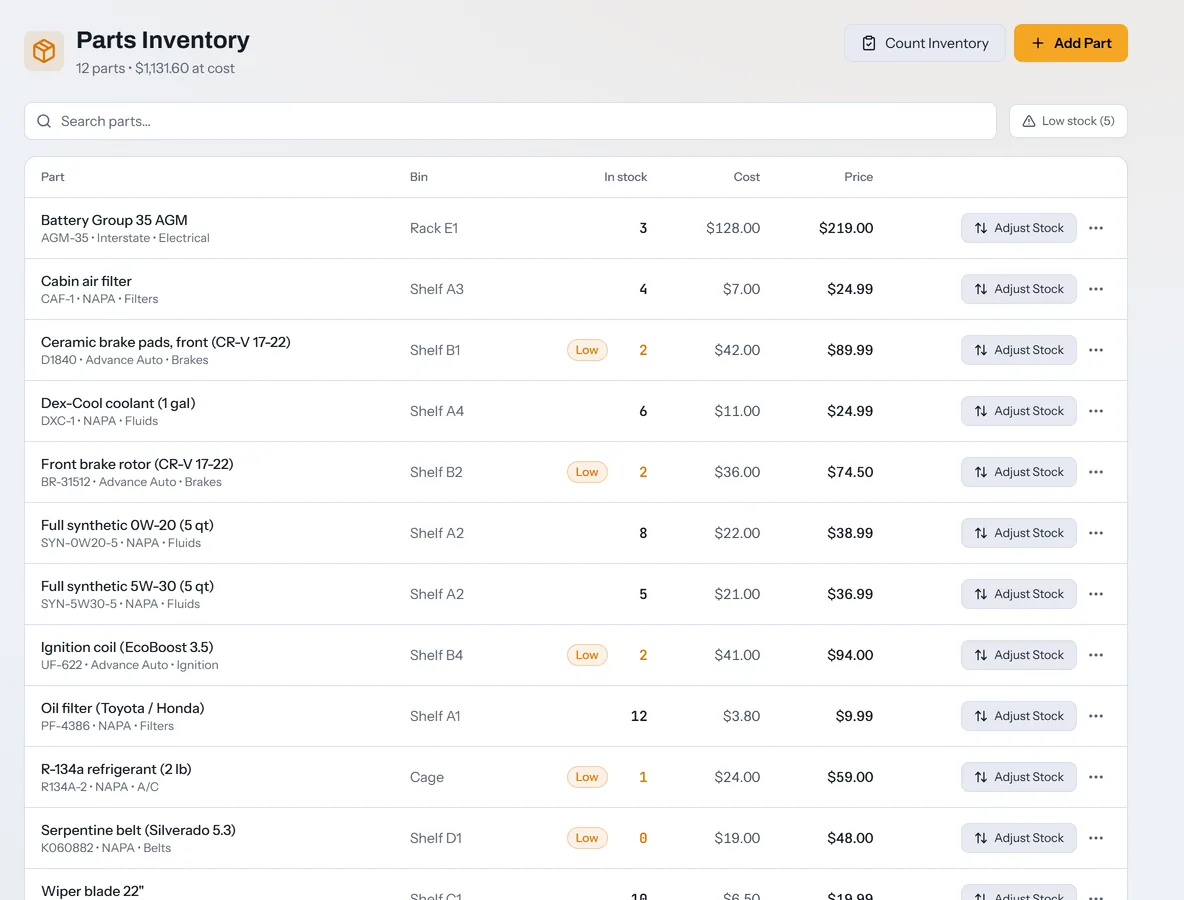
Bins, low stock, and purchase orders that update the job when parts arrive. A markup matrix prices each part as soon as you enter the cost.
Scheduling and online booking
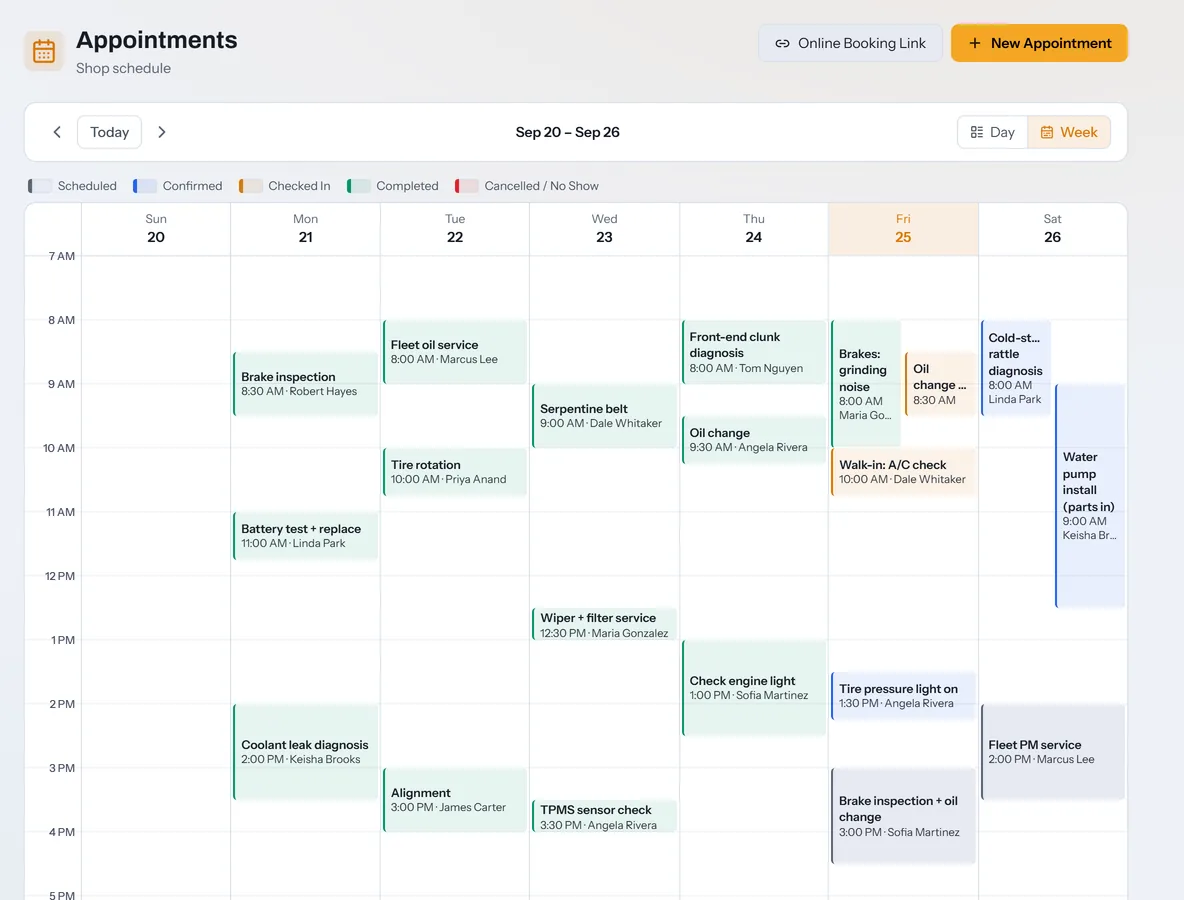
Day and week calendars, check-in straight to a repair order, and a booking page customers can use from any phone.
Waiting-room TV
A lobby screen showing up next, in the bay, and ready, by vehicle and last name only. It never shows a promise time that has already passed.
Towing and roadside
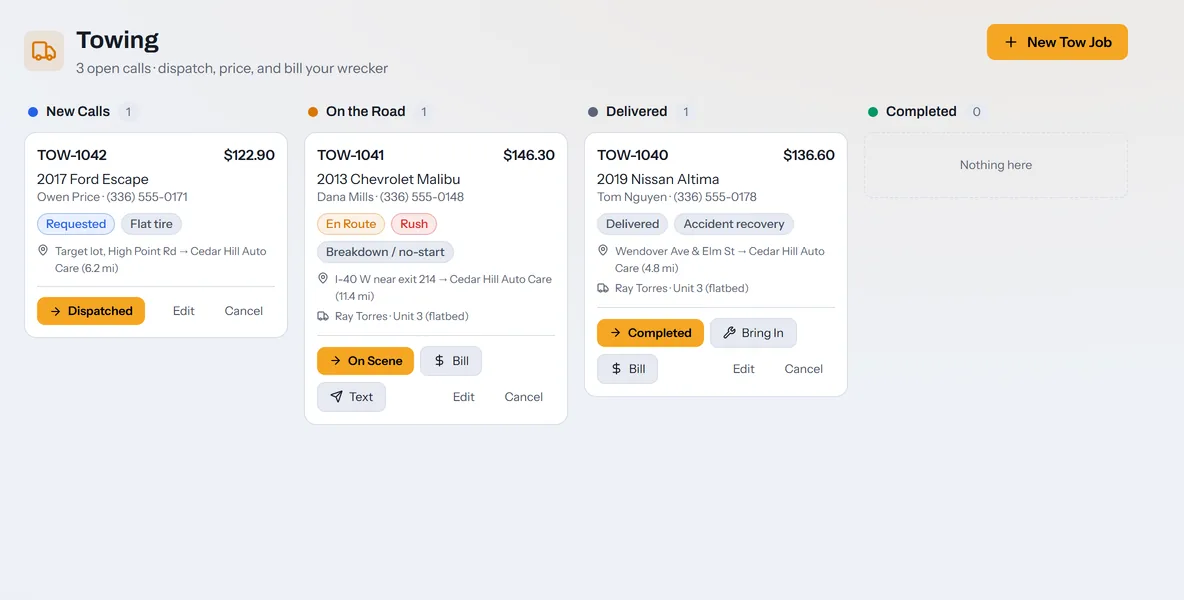
A dispatch board for your wrecker, priced by hook fee, mileage, wait, and storage, with one tap to bring the car into the shop as a repair order.
Reports across locations
Sales, gross profit, open receivables, and average ticket up top. Below that, every location you own in one table, then the revenue leaks.
Customers, vehicles, and fleets
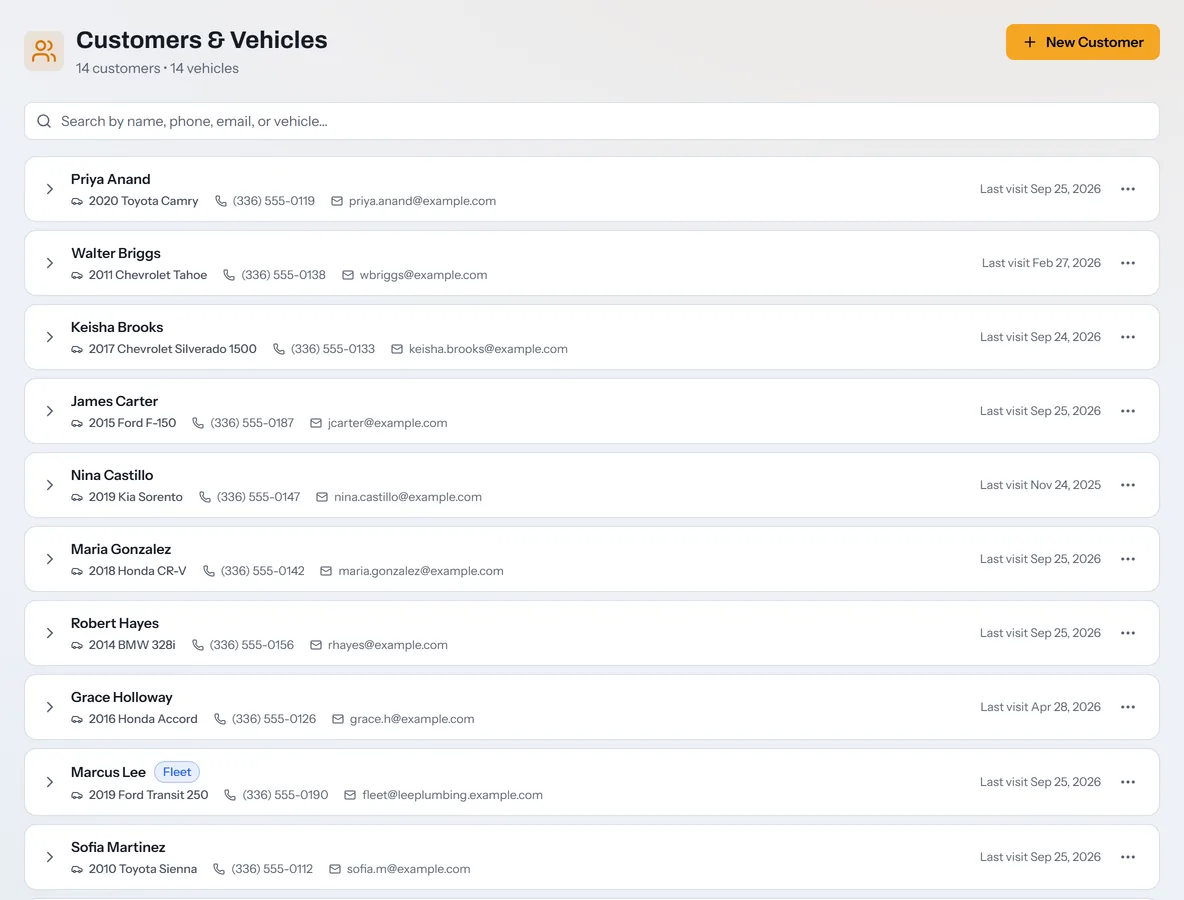
Every customer and vehicle in one searchable list. Tag fleet accounts, mark tax-exempt customers, and keep notes that follow the vehicle.
Everything included
Every feature, in every plan.
No modules, no add-ons, and no sales call to turn anything on.
Repair orders and estimates
Repair orders with a one-button next step
Labor, parts, and saved services
14 ready-made saved services
Parts pricing matrix
Estimates itemized, without line prices, or as one total
Estimate links by text or email
Line-by-line customer approval
Approvals recorded by phone or in person
Customer page preview before sending
Comeback alerts within 90 days
Previous visits and last oil change
Declined work shown on the next visit
Printable estimates and invoices
Locked paid tickets
Undo for your last 20 changes
Inspections
30-point multi-point inspection
19-item check-in walk-around
Tap-to-measure tread and brake pads
Photos, video, and PDFs on findings
Findings to the estimate in one tap
Customer report that opens on what needs service
Customer e-signature
Warning before sending unrated items
Shop floor
Shop Board by stage, tech, or bay
Late, waiter, and parts filters
Double-booked bay warning
Shop TV mode
Dispatch with job offers
My Bay for technicians
Clock in by job or by line
Auto clock-out at closing
Tech flags to the front desk
My Hours statements
Technician logins without prices
See a tech's screen from Team
Customers and texting
Customer and vehicle records
Fleet accounts and tax-exempt billing
State inspection records
Notes that follow the vehicle
Two-way texting inbox
17 editable message templates, plus your own
Five automatic text rules
Live status tracker link
Bring Customers Back
Follow-ups list
Review requests by text
Payments and accounting
Text-to-pay through Stripe
Deposits, split payments, and refunds
Store credit
Warranty, insurance, fleet, and internal pay types
Claim numbers and deductible splits
Financing link on estimates
QuickBooks Online sync
QuickBooks .IIF and CSV export
Parts and purchasing
Parts inventory with bins
Low-stock alerts
Inventory count mode
Purchase orders with partial receiving
Core charges and fees on POs
Parts-in-hand check before a job is done
Parts finder for PartsTech, NAPA, O'Reilly, Advance, AutoZone, and RockAuto
Parts purchasing report by vendor
Front counter
Day and week appointment calendar
Check-in straight to a repair order
Online booking page
Waiting-room TV
Towing and roadside dispatch
Search everything with Ctrl or ⌘ + K
AI and vehicle data
AI Diagnosis with photos
AI Assistant for the whole shop
AI notes on the dashboard
VIN scan by camera, barcode scanner, or photo
NHTSA VIN decode and spec sheet
Recalls, complaints, and bulletins for the model
Mileage-based services due
Shared VIN History Network, opt-in
Owner tools and setup
Dashboard with live shop numbers
End of Day report and nightly email
Revenue leaks and close ratio
Technician efficiency and payroll CSV
Reports across locations
Roles for owner, admin, advisor, technician, and viewer
Multiple locations under one login
Switch wizard for Tekmetric, Shop-Ware, and Mitchell 1 exports
CSV import
Getting Started checklist
Nightly cloud backups and JSON export
Light and dark mode
Installs as an app on phones and tablets
Live sync across every device
Pricing
One price per shop. Everything included.
Every plan has AI Diagnosis, inspections, QuickBooks sync, towing, and reports. Plans differ only by the number of people and locations.
14 days free, no cardStart today with the whole app. Subscribing early never shortens your trial.
Texting on your Twilio numberTexting is built in, ready for your Twilio account. Twilio bills your messages directly.
Card payments through StripeConnect Stripe in Settings to take card payments by text or at the counter.
Published starting prices checked September 17, 2026: Tekmetric Grow $349/mo, Shopmonkey Clever $399/mo, AutoLeap Pro $349/mo. Verify current pricing with each vendor. See the comparison
Questions
Good to know.
How do I get started?
Create an account at mechcorrect.app. Your shop is ready right away with 14 days free and no card. The Getting Started checklist walks you through your shop profile, bays, team, and first repair order.
What is AI Diagnosis?
A diagnostic assistant inside the app. Pick a vehicle, add trouble codes and up to three photos, and ask in plain English. It reads NHTSA recall, complaint, and service bulletin data for the model plus your shop's own past jobs, and returns an ordered test plan, usually in 10 to 25 seconds. It never invents OEM specs, and every answer tells you to verify against OEM service data. Every plan includes it, with a generous daily fair-use limit.
How does texting work?
Texting is built in and runs on your own Twilio account. Connect it in Settings, register your number for A2P 10DLC as Twilio requires, and Twilio bills your messages directly. We add nothing on top.
Do my customers need to install anything?
No. Estimates, inspection reports, the status tracker, online booking, and payment links all open in the phone's web browser.
Can customers pay by card from a text?
Yes, once you connect card payments through Stripe in Settings. One tap texts a secure link for the balance, and the repair order marks itself paid when the payment lands.
What do my technicians see?
Technician logins land in My Bay with their jobs, clock, parts status, and vehicle specs. Prices, totals, and invoices stay hidden. They can flag the front desk and track their hours in My Hours.
Can I bring my data from another system?
Yes. The switch wizard imports customer, vehicle, and repair order history exports from Tekmetric, Shop-Ware, Mitchell 1, or any CSV file.
Does it work with QuickBooks?
Yes. Connect QuickBooks Online to sync each repair order's customer, invoice, and payment, or export .IIF and CSV files for QuickBooks Desktop.
Can I run more than one location?
Yes. Switch between locations under one login, keep each shop's data separate, and see every location rolled up in Reports.
What does it cost?
Starter is $199 a month, Pro is $329, and Multi-Shop is $479 per location, with every feature in every plan. Annual billing gives you one month free. Every shop starts with 14 days free and no card, and subscribing early never shortens the trial.
Is my data mine?
Yes. Cloud backups run every night, and you can download a full JSON backup of your shop from Settings at any time.
Try it on tomorrow's cars.
14 days free and no card. Set up your shop, write your first repair order, and send an estimate the same afternoon.